ติดตามข่าวสารล่าสุดของ PU Primeและประกาศต่าง ๆ
ค้นหา
การค้นหายอดนิยม
Dear Valued Client,
To further improve the trading environment, please be advised that the minimum lot size of the following instrument will be reduced. This change will occur on the 19th December 2020.
Please refer to the table below outlining the affected instruments:
*All hours are provided in GMT+2 (Server Time in MT4.)
If you have any questions or require any assistance, please contact our support team via Live Chat, email: [email protected], or phone 400 120 0576.
Dear Valued Client,
Pacific Union launched a Live Server upgrade during this weekend and it has been completed. Meanwhile, the Client Portal is restored and MT4 Live Account Server is renamed from PacificUnion-Live1 to PacificUnionInt-Live after the upgrade, please re-login your MT4 trading platform with the following 2 methods:
1. MT4 for Mobile
• Launch the MT4 app and select “Setting”- “New Account”- “Login to an existing account” to search the new server to login.
• If clients can’t find the new server, please uninstall the old version and reinstall the new version of the MT4 trading platform from Google Play Store, App Store or our official website: https://puprimecomsta.wpengine.com/trading-platform/metatrader4/
2. MT4 for PC
• Please uninstall and download the latest version of MT4 trading platform from our official website: https://puprimecomsta.wpengine.com/trading-platform/metatrader4/, please kindly search the new server to login with your account details afterwards.
*Please note that the old server of PacificUnion-Live1 is not available since 12th December 2020, please be sure to download the latest version of MT4 and login in with the updated server.
If you forget the MT4 Account password, please log in Client Portal:https://myaccount.puprime.com/login to click “Reset MT4 Password” field in the account on the main page. The new password will be sent to your registered email immediately. Please note that the password of MT4 could be reset once a day.
If you have any questions or require any assistance, please contact our support team via Live Chat, email: [email protected],or phone 400 120 0576.
Dear Valued Client,
To provide a better reliable trading environment, Pacific Union would like to launch a Live Server upgrades from MT4 Server Time (GMT+2) 00:00 of December 12th 2020 to 11:00 of December 13th 2020.
The maintenance would make clients unable to log in MT4 Live Account temporarily, but it won’t make any changes on account details such as password or affect any position which has been opened. At the same time, the function of deposit, withdrawal and data searching in Client Portal would be not available to use. We recommend clients to do arrangement in advance.
After the upgrade, MT4 Live Account Server will be renamed from PacificUnion-Live1 to PacificUnionInt-Live, you could re-login with the following 2 method:
1. MT4 for Mobile
• Launch the MT4 app and select “Setting”- “New Account”- “Login to an existing account” to search the new server to login.
• If clients can’t find the new server, please uninstall the old version and reinstall the new version of the MT4 platform from Google Play Store, App Store or our official website: https://puprimecomsta.wpengine.com/trading-platform/metatrader4/
2. MT4 for PC
• Please uninstall and download the latest version of MT4 trading platform from our official website: https://puprimecomsta.wpengine.com/trading-platform/metatrader4/ , please kindly search the new server to login with your account details afterwards.
* Please note that the above links is effective from December 12th, please be sure to download the latest version of MT4 after this date.
If you forget the MT4 Account password, you can click: https://myaccount.puprime.com/login to log in the Client Portal to click “Reset MT4 Password” field in the account on the main page. The new password will be sent to your registered email immediately. Please note that the password of MT4 could be reset once a day.
The Client Portal will be restored and you could re-login MT4 trading platform with the above methods as long as the maintenance has been completed. We will announce the completion accordingly, please pay attention closely.
If you have any questions or require any assistance, please contact our support team via Live Chat, email: [email protected], or phone 400 120 0576.
Dear Valued Client,
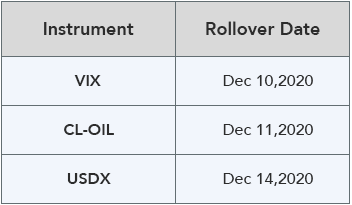
Due to the rollover date of VIX index, Oil CFD(CL-OIL) and USDX index is approaching, please be advised that the pricing are difference between old and new futures contracts, we recommend clients to monitor their positions closely and properly control their positions.
New contracts for VIX index, Oil CFD(CL-OIL) and USDX index will automatically be rolled-over as below:
*All hours are provided in GMT+2 (Server Time in MT4.)
Please note:
• The rollover will be automatic, and any existing open positions will remain open.
• Positions that are open on the expiration date will be adjusted via a rollover charge or credit to reflect the price difference between the expiring and new contracts.
• To avoid CFD rollovers, clients can choose to close any open CFD positions prior to the expiration date.
• Clients should ensure that take profits and stop losses are adjusted before this rollover occurs.
If you have any questions or require any assistance, please contact our support team via Live Chat, email: [email protected], or phone 400 120 0576.
Dear Valued Client,
Regarding our current method of combining indices dividends with swaps, please be advised that we expect to launch the new feature starts from November 16th 2020 to separate indices dividends with swaps in order to add more clarity on these rates.
The impact of this change will be that the indices dividends will not be paid or charged as an inclusion along with the swap component. Indices dividends will be executed separately through a balance statement directly to your trading account. The comment for trading index CFDs will be in the following format “Div&< Product Name >&< Net Volume >” which show in the balance.
For example, the comment shows in the balance will be “Div & NAS100 & 5” for trading 5 lots NAS100 for Long. On the contrary, the comment shows in the balance will be “Div & NAS100 & -5” for trading 5 lots NAS100 for Short.
Please note that the above adjustment is only displayed in the new format and there is no impact to the total cost.
If you have any questions or require any assistance, please contact our support team via Live Chat, email: [email protected], or phone 400 120 0576.
Dear Valued Client,
Due to the rollover date of VIX index is approaching, please be advised that the pricing are difference between old and new futures contracts, we recommend clients to monitor their positions closely and properly control their positions.
New contracts for VIX index will automatically be rolled-over as below:
*All hours are provided in GMT+2 (Server Time in MT4.)
Please note:
• The rollover will be automatic, and any existing open positions will remain open.
• Positions that are open on the expiration date will be adjusted via a rollover charge or credit to reflect the price difference between the expiring and new contracts.
• To avoid CFD rollovers, clients can choose to close any open CFD positions prior to the expiration date.
• Clients should ensure that take profits and stop losses are adjusted before this rollover occurs.
If you have any questions or require any assistance, please contact our support team via Live Chat, email: [email protected], or phone 400 120 0576.
Important Notice to Visitors
Our products and services are not offered or made available to residents of your jurisdiction. The information on this Website is not directed at persons in your jurisdiction and is not intended as an offer, solicitation, or promotion of our products or services to them.
By clicking “I Understand”, you acknowledge this notice and confirm that you are accessing this Website at your own initiative. Access to this Website does not mean that our products or services are available to you.
Important Notice
Please be advised that our products and services are currently unavailable to residents and entities located in the Philippines.
This restriction is a result of our firm commitment to adhering to applicable legal and regulatory requirements in all jurisdictions where we operate. In line with our internal compliance protocols and evolving global standards, we continuously assess and update access to our platform to ensure full regulatory alignment.
We appreciate your understanding and cooperation.
If you believe this restriction has been applied in error, please contact our support team for further assistance.
Dear Valued Client,
As part of PU Prime’s ongoing commitment to providing a stable and reliable trading environment, please be informed of the following weekly weekend scheduled optimisation activities:
We sincerely apologise for any inconvenience this may cause as we strive to provide you with better service. PU Prime is committed to providing you with the best trading experience and this Weekly Scheduled Optimisation Notice will enable us to ensure that you trade without any unexpected interruptions.
For other upgrades that may involve longer disruptions to your trading, we will announce them ahead of time in a separate announcement.
Important Notice:
Please note the Website is intended for individuals residing in jurisdictions where accessing the Website is permitted by law.
Please note that PU Prime and its affiliated entities are neither established nor operating in your home jurisdiction.
By clicking the "Acknowledge" button, you confirm that you are entering this website solely based on your initiative and not as a result of any specific marketing outreach. You wish to obtain information from this website which is provided on reverse solicitation in accordance with the laws of your home jurisdiction.
Aviso importante:
Ten en cuenta que el sitio web está destinado a personas que residen en jurisdicciones donde el acceso al sitio web está permitido por la ley.
Ten en cuenta que PU Prime y sus entidades afiliadas no están establecidas ni operan en tu jurisdicción de origen.
Al hacer clic en el botón "Aceptar", confirmas que estás ingresando a este sitio web por tu propia iniciativa y no como resultado de ningún esfuerzo de marketing específico. Deseas obtener información de este sitio web que se proporciona mediante solicitud inversa de acuerdo con las leyes de tu jurisdicción de origen.